
Google just added a Lighthouse score for a visitor that isn’t human.
Open Chrome’s Lighthouse, run an audit, and next to Performance, Accessibility, Best Practices, and SEO there’s a new category: Agentic Browsing. It grades one thing. How easily an AI agent can read your site and actually do something on it. Click the button. Fill the form. Find the answer.
My site scores 3 out of 3. Screenshot below, because a claim about AI-visible web design is worth nothing without the receipt.
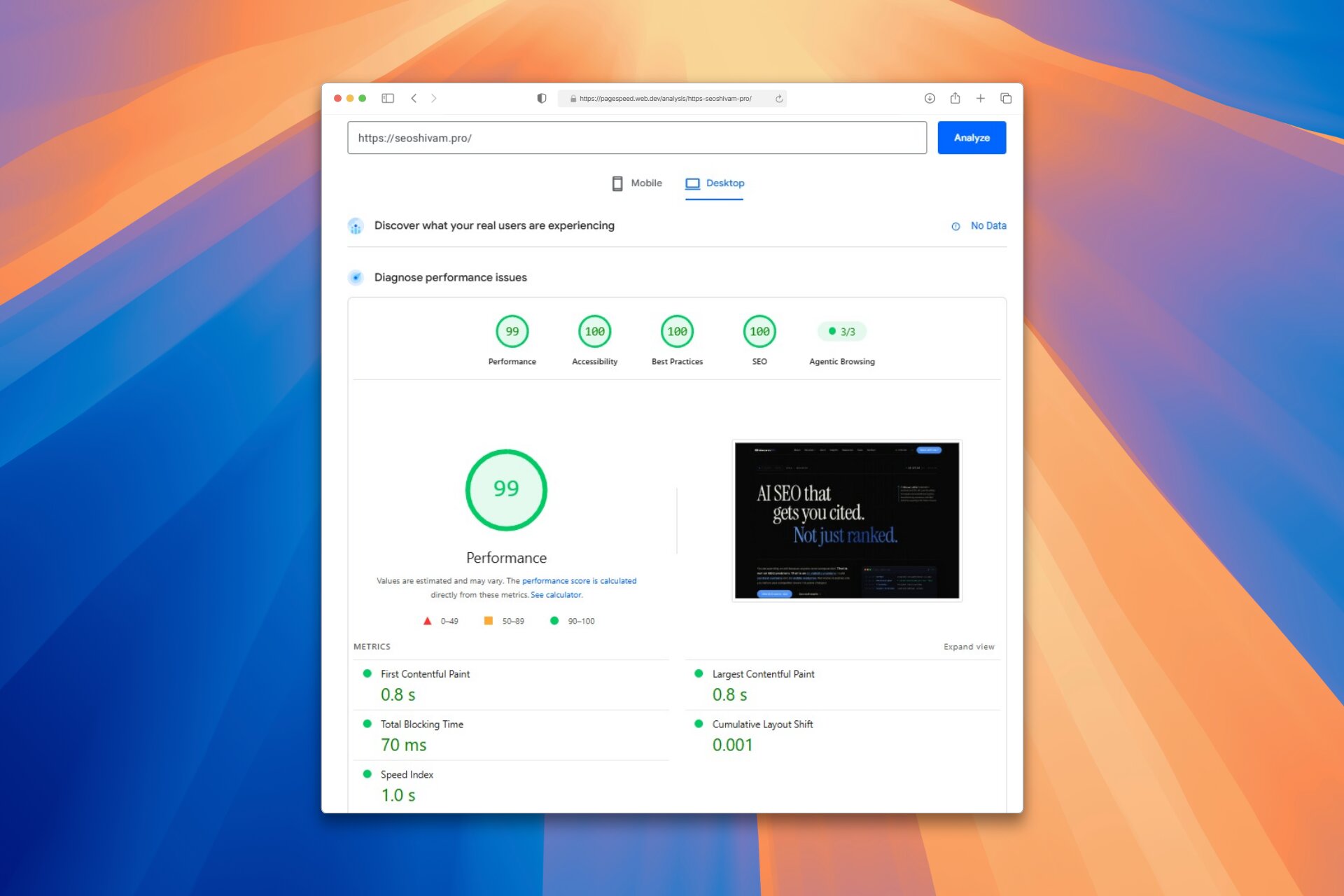
Here’s what the category checks, why the number moves around, and how to pass it without chasing a badge.
What Agentic Browsing actually is
Agentic Browsing is a new, experimental Lighthouse category that evaluates how well your site is built for machine interaction. Not for a person skimming with their eyes. For an AI agent parsing your page and deciding whether it can complete a task on someone’s behalf.
Sit with that shift. For years, web quality meant three questions: does it look right, does it load fast, can a screen reader use it. There’s a fourth now. Can a machine operate it. Agents are becoming the visitor, and Google just started scoring for them.
Two caveats up front, because it’s early. The category is experimental and based on proposed standards. It needs Chrome 150 or later, and the WebMCP checks require registering for the WebMCP origin trial. Treat the number as a direction, not a verdict.
It isn’t scored like the other four
Every other Lighthouse category hands you a 0 to 100. Agentic Browsing doesn’t, on purpose. The standards for the agentic web are still forming, so Google’s goal right now is to gather data and give you actionable signals, not rank you.
So instead of a score you get:
- A fractional score, like 3/3: how many agentic readiness checks your site passes.
- Pass or fail status: specific audits throw errors or warnings when a technical requirement, like WebMCP schema validity, isn’t met.
- A pass ratio in the header, so you can watch progress at a glance.
3/3 doesn’t mean perfect. It means you cleared every check that exists today. The bar will rise. That’s the whole reason it shipped as experimental.
What it actually checks
Under the hood, three buckets.
WebMCP integration. Lighthouse talks to the Chrome DevTools Protocol to watch your page register tools an agent can call, counting both declarative tools defined in your HTML and imperative ones defined in JavaScript. WebMCP is the emerging standard for exposing your site’s actions, your forms and your logic, in a structured way instead of making the machine guess. It’s the same instinct behind structured data for AI: stop forcing the crawler to reverse-engineer you.
Agent-centric accessibility. This is the part most sites half-have and don’t realize now matters double. Agents don’t see your design. They read the accessibility tree, and that tree is their entire model of your page. Lighthouse pulls the subset of a11y checks that decide whether a machine can operate you: every interactive element has a real programmatic name, roles and parent-child relationships are valid, and nothing interactive is hidden from the tree. Style a button as a bare <div> with no name and a human clicks it fine while an agent never finds it.
Stability and discoverability. Two checks here. Cumulative Layout Shift, because an agent that locates a button and reaches for it a fraction of a second later will miss if your layout jumps. And llms.txt, a machine-readable summary at your domain root that Lighthouse now looks for.
Why the number moves around
Here’s the part that trips people up. The audits are deterministic, but your result can still wobble between runs. Three reasons Google names:
- Dynamic tool registration. If you register WebMCP tools with JavaScript, the timing decides whether Lighthouse catches them in its snapshot. Register late, look empty.
- A shifting accessibility tree. Big or complex DOM changes reshape the tree the agent depends on, run to run.
- Layout instability. Cumulative Layout Shift from ads, unsized images, or injected content moves elements between the moment an agent identifies one and the moment it tries to act. The same CLS that hurts humans and rankings now breaks agent clicks.
If your number bounces, it’s usually one of those three, not a bug.
What this actually means
Strip away the WebMCP novelty and the message is old. The web is being built for two audiences now, and the second one doesn’t have eyes.
An agent reads your accessibility tree the way you read a page. Semantic HTML, honest ARIA, real names on real controls: that stopped being an accessibility nicety and became the machine-eye view of your site. The sites that already did this well, for screen readers, for answer engine optimization, for plain craft, are the ones quietly passing this category on day one. Mine wasn’t rebuilt for agents. It was built clean, and clean happens to be exactly what agents need.
And notice what’s not on the list. No keyword tricks. No content volume. No schema-stuffing ritual. The checks are structural: can a machine understand and operate this thing with confidence. That’s the whole of AI-visible construction, and Lighthouse just turned it into a number you can watch.
How to pass it (and actually be ready)
Four moves, in order of payoff.
- Fix the accessibility tree first. It’s the biggest bucket and the one you probably already owe. Semantic elements, proper labels, valid roles, nothing interactive hidden. Clear the standard Accessibility audit and most of Agentic Browsing follows for free.
- Kill layout shift. Set width and height on every image and embed, reserve space for anything injected, and hold CLS near zero. Mine sits at 0.001. That’s not luck, it’s discipline, and it’s the same discipline behind AI-ready web design.
- Add a real llms.txt. A short, honest, machine-readable summary of what your site is and where the important pages live. Lighthouse checks for it. Just don’t buy it as magic: a text file on a broken site does nothing. It’s the cherry, not the cake.
- Expose your actions with WebMCP. The new, optional-for-now frontier: register your forms and core actions as WebMCP tools so an agent can use them directly instead of scraping your UI. Early and experimental, and clearly where this is heading.
Want your own number? Run your site through PageSpeed Insights or Lighthouse in Chrome 150+ and read the Agentic Browsing panel. It tells you exactly which checks you’re failing.
The honest version
This is experimental. It needs a bleeding-edge Chrome, half of it rides on an origin trial, and the checks will change. Don’t rebuild your roadmap around a 3/3.
But don’t wave it off either. Google doesn’t ship a Lighthouse category to gather dust. This is the early scaffolding of how agents will decide whether your site is usable, the same way Core Web Vitals started as a lab curiosity and became a ranking input. The brands building clean, stable, machine-readable sites now are the ones agents will actually be able to transact with when this stops being experimental. If that’s the standard you want to hit without running the audits yourself, that’s the job when you hire an AEO consultant.
The visitor changed. Google just handed you a scorecard for the new one. Worth knowing where you stand.
Source: Lighthouse agentic browsing scoring, Chrome for Developers, updated May 5, 2026.
Common questions,
direct answers.
01 What is the Agentic Browsing category in Lighthouse?
Agentic Browsing is an experimental Lighthouse category, introduced in 2026, that evaluates how well your site is built for AI agents to read and operate rather than for human eyes. It uses deterministic audits covering WebMCP tool registration, the accessibility tree, layout stability, and llms.txt. It requires Chrome 150 or later, and the WebMCP checks need the WebMCP origin trial.
02 How is the Agentic Browsing category scored?
Unlike other Lighthouse categories, it does not give a weighted 0 to 100 score. Because the agentic web standards are still emerging, it shows a fractional pass ratio such as 3/3, individual pass or fail statuses that emit errors or warnings when a requirement like WebMCP schema validity is unmet, and an informational pass ratio in the header. Passing every check means you cleared the current bar, not that the page is perfect, and the bar will rise over time.
03 What does the Agentic Browsing category actually check?
Three areas. WebMCP integration verifies that your site registers tools an agent can call, both declarative tools defined in HTML and imperative tools defined in JavaScript. Agent-centric accessibility checks that interactive elements have programmatic names, that roles and parent-child relationships are valid, and that interactive content is not hidden from the accessibility tree. Stability and discoverability measures Cumulative Layout Shift and checks for an llms.txt summary at your domain root.
04 How do I improve my Agentic Browsing score?
Start with the accessibility tree, since agents use it as their primary model of the page: semantic HTML, real ARIA labels, valid roles, and nothing interactive hidden. Reduce Cumulative Layout Shift by setting dimensions on images and reserving space for injected content. Add a genuine llms.txt at your domain root. Then, optionally, expose your forms and key actions as WebMCP tools so agents can use them directly. Scores can fluctuate with dynamic tool timing and DOM changes, so retest more than once.